PAN Name Change Rejected in Karnataka: Reasons and Fixes
Your PAN name change application got rejected? You are not alone, and it is usually fixable. Here are the six most common reasons PAN name change applications fail in Karnataka, and exactly how to fix each one.
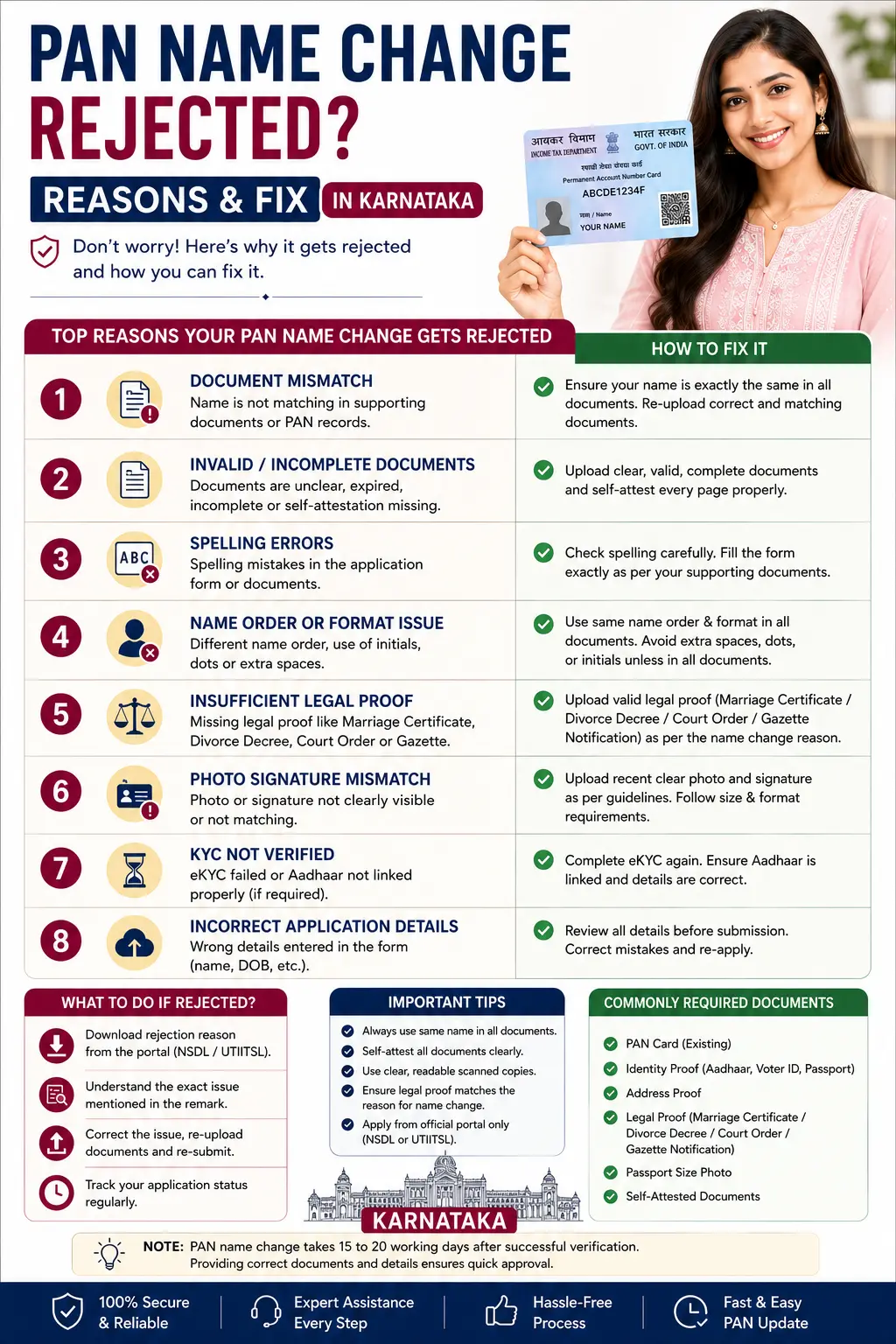
This is a troubleshooting guide. For the full process, see the main PAN card name change guide.
On this page
- Identity proof is not change proof
- Reason 1: Name does not match proof
- Reason 2: Mismatch with Aadhaar
- Reason 3: Unclear or incomplete document
- Reason 4: Photo or signature issue
- Reason 5: Wrong type of proof
- Reason 6: Wrong application category
- Find the actual reason, and the right provider
- How to reapply the right way
- The 15 day rule, and how to avoid it
- Areas we serve
- People also ask
- Frequently asked questions
Identity Proof Is Not Change Proof
Before the individual reasons, there is one confusion behind a large share of rejected name change applications. Two different things are being asked for, and people supply only the first.
- Identity proof says who you are — Aadhaar, a passport, a voter card. It establishes that the applicant exists and is the person named.
- Change proof says the name changed — a marriage certificate, a divorce decree or a Gazette notification, showing the movement from one name to another.
- A name change application needs both — and submitting only identity documents is one of the commonest reasons a correction comes back.
- Aadhaar alone does not carry the change — even in your new name, it shows the current position rather than evidencing how you got there.
- Which is why a Gazette solves several problems at once — it is unambiguous change proof, and it works where no certificate covers your situation.
- A correction is different — where you are fixing a typo rather than changing a name, identity documents showing the correct spelling are the proof, and no change proof exists to give.
Name Does Not Match Your Proof
This is the most common cause. The name you entered on the form does not exactly match the name on the document you submitted as proof. Even a small difference, like a missing initial or an extra middle name, can lead to rejection.
Match the form to the proof exactly
- Enter your name exactly as it appears on your proof.
- If your proof shows the wrong name, fix the proof first, or use a gazette.
Mismatch with Aadhaar
PAN verification often checks against Aadhaar. If your PAN application name does not align with your Aadhaar, the system can reject it. This is common when you have updated one document but not the other.
Align PAN and Aadhaar
- Update Aadhaar to your intended name first, or keep both consistent.
- See our Aadhaar name change guide.
Unclear or Incomplete Document
If your uploaded proof is blurry, cut off, or missing a page, it cannot be verified and the application is rejected. A faint scan or a document without the key details is a frequent problem.
Submit a clear, complete document
- Upload a sharp, full scan showing all details.
- Make sure names, dates, and stamps are clearly visible.
Photo or Signature Issue
A fresh PAN card needs a proper photo and signature. If the photo does not meet the spec, or the signature is unclear or outside the box, the application can be sent back.
Follow the photo and signature spec
- Use a clear, recent passport-style photo.
- Sign clearly within the marked area.
Wrong Type of Proof
Some proofs do not establish a name change. For example, a divorce decree alone does not prove your new name, and an outdated ID does not reflect the change you want. Submitting the wrong proof leads to rejection.
Use the correct proof for your case
- Marriage certificate for marriage, gazette for divorce or a new name.
- A gazette often solves multiple proof problems at once.
Wrong Application Category
Choosing the wrong option on the form, such as applying for a correction when you need a legal name change, can cause a rejection because the proof no longer matches the category you selected.
Select the right category
- Match the category to your real situation.
- See correction vs legal change to decide.
Find the Actual Reason, and the Right Provider
Guessing why an application was rejected wastes another attempt. There is a way to find out, and a related point that catches people out before they even file.
- You are told the reason — it is sent to the email address and mobile number on the application, and it names the specific problem rather than a generic failure.
- Check the spam folder — these messages routinely land there, and people conclude nothing was sent.
- Or track it with your reference number — the acknowledgement number issued after payment, which the status page reads against.
- Turn the card over to find your provider — the back of a PAN card names whether it was issued through Protean, formerly NSDL, or UTIITSL, and a correction should go through that provider.
- The two run parallel services — each with its own portal and its own reference, a fifteen digit acknowledgement on one and a coupon number on the other.
- A rejected application cannot be edited — you file a fresh one, which produces a new reference number, so keep the old one only for understanding what went wrong.
How to Reapply the Right Way
Read the rejection reason
The rejection note usually states what went wrong. Start there.
Fix that exact issue
Correct the specific problem, whether it is proof, photo, or category.
Get a gazette if proof was the issue
A gazette gives one clean, official proof that solves most proof problems.
Reapply through Form 49A
Submit a fresh correction with the corrected details and proof.
Verify and track
Complete verification and track the application to confirm approval.
The 15 Day Rule, and How to Avoid It
How you submit decides whether there is a postal deadline hanging over your application. This is a quiet cause of failure that has nothing to do with your documents.
- Choosing the physical route creates a deadline — where you opt to forward documents, the signed acknowledgement and the papers have to reach the processing office within fifteen days of filing online.
- Miss it and the file does not proceed — through no fault of the documents themselves, which is a frustrating way to lose a fee.
- The paperless route removes it entirely — Aadhaar based verification with an electronic signature means nothing is printed or posted.
- But the Aadhaar mobile has to be linked — the one time password goes there, and an old or unlinked number is the usual reason that route fails.
- Repeated failures can lock the attempt — so pause rather than trying again immediately, and check the mobile number on your Aadhaar record first.
- Tick only what you are changing — the portal leaves unticked fields exactly as they are, so a correct new name typed without the box ticked simply does not get processed.
What Other Pages Leave Out
These are the gaps we found on pages covering a rejected PAN name change.
- Missing everywhere: no page separates identity proof from proof of the change, which is the confusion behind a large share of rejections.
- Missing: no page tells you that the reason is emailed and messaged to you, and that these notifications routinely land in spam.
- Missing: no page mentions that the back of your card names the provider, and that the correction should go through the one that issued it.
- Missing: no page warns about the fifteen day deadline for forwarding documents on the physical route.
- Missing: no page explains that a rejected application cannot be edited, so a fresh one with a new reference number is the only route.
- Missing: no page notes that unticked fields are left untouched, so a correct name typed without ticking the box is simply not processed.
Forms, portals, fees and procedures change, including the correction forms notified from April 2026. Confirm the current position on the provider's own portal or on incometax.gov.in. This page is general information and not tax advice.
PAN Rejection Help Across Karnataka
We help fix rejected PAN name change applications in every district of Karnataka:
Do not see your city? We serve all Karnataka districts. Just contact us.
People Also Ask About a Rejected PAN Name Change
These are the follow-up questions Karnataka applicants search most, answered in one or two lines each.
Why was my PAN name change rejected?
Is Aadhaar enough proof for a PAN name change?
How do I find out the actual reason?
Can I edit and resubmit the rejected application?
Should I apply through Protean or UTIITSL?
What is the fifteen day rule?
How do I avoid that deadline?
The Aadhaar verification keeps failing. Why?
I typed the correct name but nothing changed.
Should I change everything when I reapply?
Frequently Asked Questions
Why was my PAN name change application rejected?
Can I reapply after my PAN name change is rejected?
How does a gazette help with a rejection?
My name did not match Aadhaar. What do I do?
Will I lose my fee if my application was rejected?
Can you fix my rejected PAN application?
People also search for: PAN name change rejected, PAN correction rejected reasons, why PAN application rejected, reapply PAN name change, PAN name mismatch Aadhaar, fix rejected PAN application.
Rejected PAN Application? We Will Get It Approved
Send us your rejection reason. We find the exact problem, arrange a gazette if needed, prepare a clean Form 49A, and guide the reapplication so your PAN name change finally goes through.
People Also Search For
Related searches that come up alongside a rejected PAN name change, each answered in a line so you know whether it applies to you.
- PAN acknowledgement number status check — the reference issued after payment, which the provider's status page reads against.
- PAN correction rejection email not received — check the spam folder first, since these notifications routinely land there.
- Which provider issued my PAN — the back of the card names it, and the correction should go through that provider.
- PAN correction paperless e-KYC — the Aadhaar based route with an electronic signature, which removes the postal deadline.
- Aadhaar OTP not received PAN application — usually an old or unlinked mobile number on your Aadhaar record.
- PAN correction form CR-01 — the correction form for individuals notified from April 2026, served by the portal automatically online.
- PAN correction vs legal change — which category applies to you. See our correction vs legal change guide.
- NSDL vs UTIITSL for PAN — how the two compare. See our NSDL vs UTIITSL guide.
- PAN card name change process — the full picture. See our PAN name change guide.
- Aadhaar name change Karnataka — the record PAN is checked against. See our Aadhaar name change guide.
- Gazette notification for name change — the change proof that settles most cases. See our gazette name change guide.